In short
A support chatbot becomes more useful when the team can read what happened, fix the source behind a weak answer, and see whether the promised action actually occurred.
Visitor: Can someone come this Saturday?
Tiller Air Assistant: Saturday hours are 9am to 1pm, and the office confirms the exact time.
That exchange is a small picture of our autumn work. The assistant answered the hours question, then left the exact appointment to a person. The interesting boundary is the gap between “we can take your preferred time” and “you have a booking.” A support team needs to see that gap when it opens the inbox the next morning.
Our earlier dashboard made it easier to set up a bot. This autumn, we spent more effort on what happens after a visitor starts talking: who reads the conversation, which source explains an answer, and what remains for a person to do. The published October 3 release gave the pages a common layout and made unavailable controls explain what would enable them. That sounds modest, but it changes the first five minutes for an operator. A disabled action should tell the team what is missing rather than leave them guessing.
October 4: conversations became the work surface
The first October 4 release turned Live Activity into an inbox with views and counts. The navigation put monitoring ahead of configuration. That ordering expresses a decision: after launch, the daily question is less often “which setting should I change?” and more often “which customer is waiting, and why?” It also made exports include the extracted text behind web pages and uploaded files, so a team can inspect what its bot was given to read.
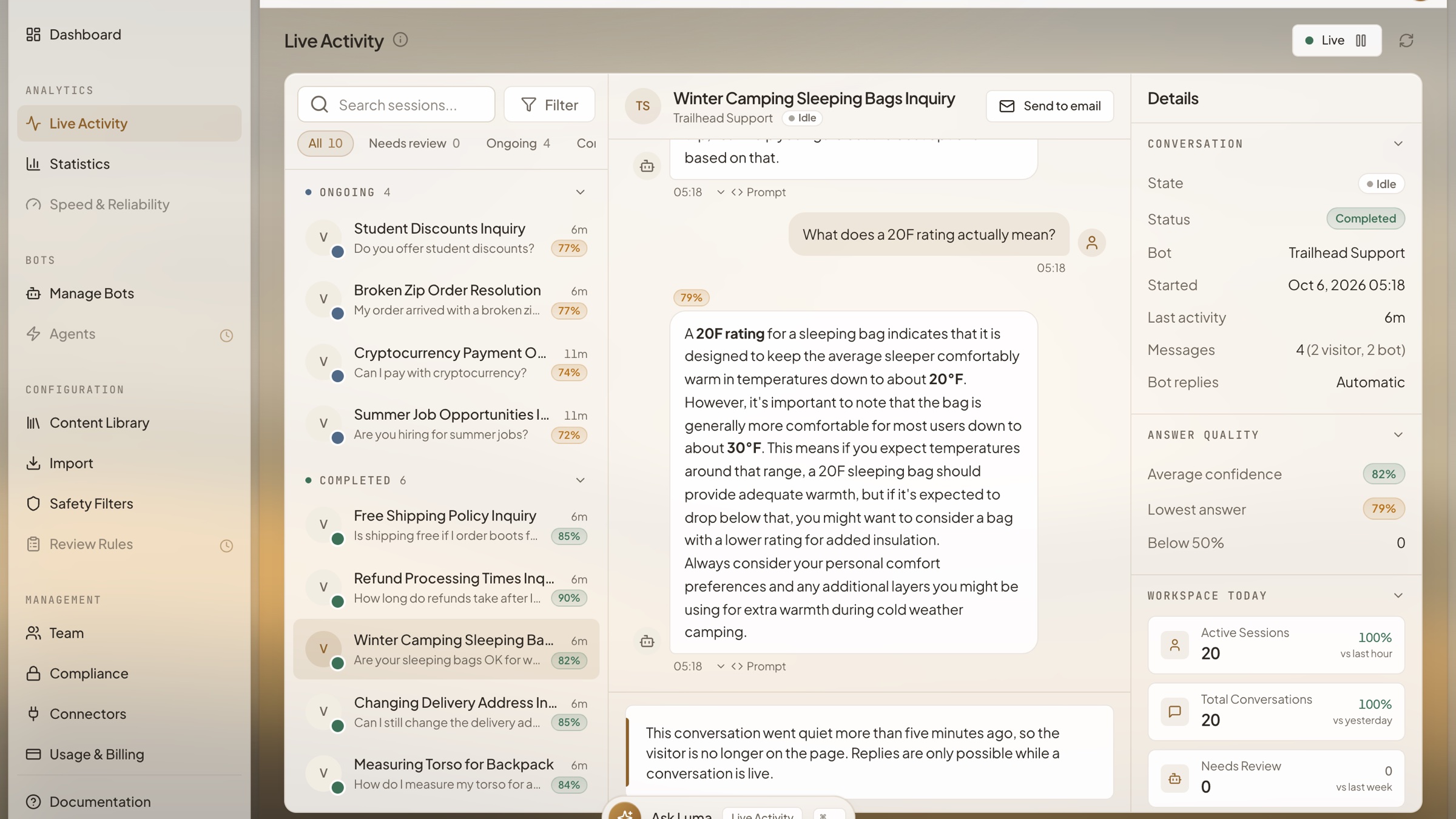
A second October 4 release added teammate replies and email escalation from that inbox. It also opened more routes for bringing existing support knowledge into the bot: a help center page, a spreadsheet of answers, and exports from help-desk tools. The useful part is the check before publishing a new source. A preview can compare past questions with the added material, giving an operator a reason to keep, revise, or reject it. Importing more pages is only helpful when the answers improve.
| Date | What changed | What to check |
|---|---|---|
| October 3 | A shared dashboard layout and clearer unavailable controls | Can a new teammate tell why a control is off? |
| October 4 | Conversation views, replies and knowledge imports | Which conversation needs a person or a better source? |
| October 15 | The released action and knowledge batch | Did the action complete, or did the bot only collect details? |
October 15: the answer acquired a next step
The October 15 release record includes a larger batch of chat actions and knowledge work. Its scheduling flow can handle a request to book, change, or cancel; other flows can fetch information before an answer. We are careful about what that record proves. A published release describes the shipped design. The Tiller Air exchange proves that a public demo answered a question and rendered a form. Neither one proves that this particular visitor booked a slot, because no visitor details went in.
This distinction is the design lesson we would carry to any support bot. When a chatbot can act, the transcript should separate an offered action, a collected request, and a completed action. A customer should never have to infer completion from a warm sentence. A support lead should be able to read the conversation later and know whether to follow up.
The support surface extends beyond the dashboard
The WordPress plugin directory now has a HoverBot listing. That matters to a store owner choosing where a chatbot sits: installing a widget is only the first step, and the knowledge and handoff behind it still need an owner. Anthropic’s Claude connector directory also lists HoverBot. Its practical promise is a read-only route to ask about conversations and gaps in plain language. A listing is a way to reach the support data; it is not evidence that any particular store improved its results.
Our verdict after this run of releases: an inbox is valuable when it changes the morning routine. The team should see the shopper still waiting, the answer with a missing source, and the action that was offered but not confirmed. A dashboard that only celebrates a fluent reply misses the work that follows it.
Four checks for your bot this week
- Ask a real support question and read the full conversation in the team inbox the next morning. Identify who owns the next reply.
- Pick one answer that felt incomplete. Open the source the bot used, correct it with an owner, and ask the question again.
- Try an appointment or order action without finishing the form. Check whether the bot clearly says it is still waiting.
- Ask which conversations needed a person last week. Review one handoff for the exact request and the state it left behind.
If you want a bounded example, try the fictional Tiller Air demo and ask about Saturday. Watch what the assistant answers, what it requests, and what it does not confirm.
Frequently asked questions
- What changed in HoverBot’s support workflow this autumn?
- The dashboard gained a conversation inbox, teammate replies, email escalation, and ways to inspect questions against newly added knowledge. Published release notes document the changes; operators should check the running app for the features available to their workspace.
- Can a chatbot offer an appointment without confirming a booking?
- Yes. A live fictional-business demo answered a Saturday-hours question and showed a contact form, but no details were submitted and no booking was confirmed. A bot should distinguish collecting a preferred time from a confirmed calendar record.
- What should a support lead review in the inbox each morning?
- Read conversations that need a person, unanswered questions that reveal source gaps, and any claimed action whose completion needs checking. Then update the owned source or handoff rule, and test a similar question again.
Sources
- HoverBot WordPress plugin · WordPress.org
- HoverBot listing in the Claude directory · Anthropic
About the author
Founder & CEO at HoverBot
Founder of HoverBot, where he leads product strategy and applied AI architecture, and CTO and co-founder of WTFox.ai, a separate company. Nineteen years in software engineering, most recently as Software Architect at Mercer, where he shipped HR chatbots and OCR claims processing on Azure AI, and as tech lead at Darwin and Technosoft SEA, after engineering roles at Sberbank, Veon, and Softline. Hands-on with architecture decisions, deployment operations, and benchmark-driven quality optimization. Based in Singapore.
- 19 years of software engineering, architecture, and engineering leadership
- Founder of two separate AI startups: HoverBot and WTFox.ai
- Applied AI: conversational systems, RAG pipelines, agentic workflows, and safety controls
- Enterprise AI delivery: HR chatbots and OCR claims processing on Azure AI at Mercer
- Led engineering teams of 10+ as tech lead and software architect
- Cross-industry: enterprise HR and benefits, banking, telecom, automotive, e-commerce and marketplaces
- Writes on AI chatbot architecture, agentic systems, and deployment patterns at vitaliks.me