
In short
Human escalation works when a chatbot transfers the question, context, and next action to a named support owner and tells the customer what happens next.
A support lead opens the inbox on Monday. A shopper asked the bot for a person on Saturday, but the chat is marked answered and nobody owns the next reply. How can you add human escalation to a chatbot? Give the shopper a reliable way to ask for a person, send the whole conversation to an owned queue, and say clearly when that person will respond.
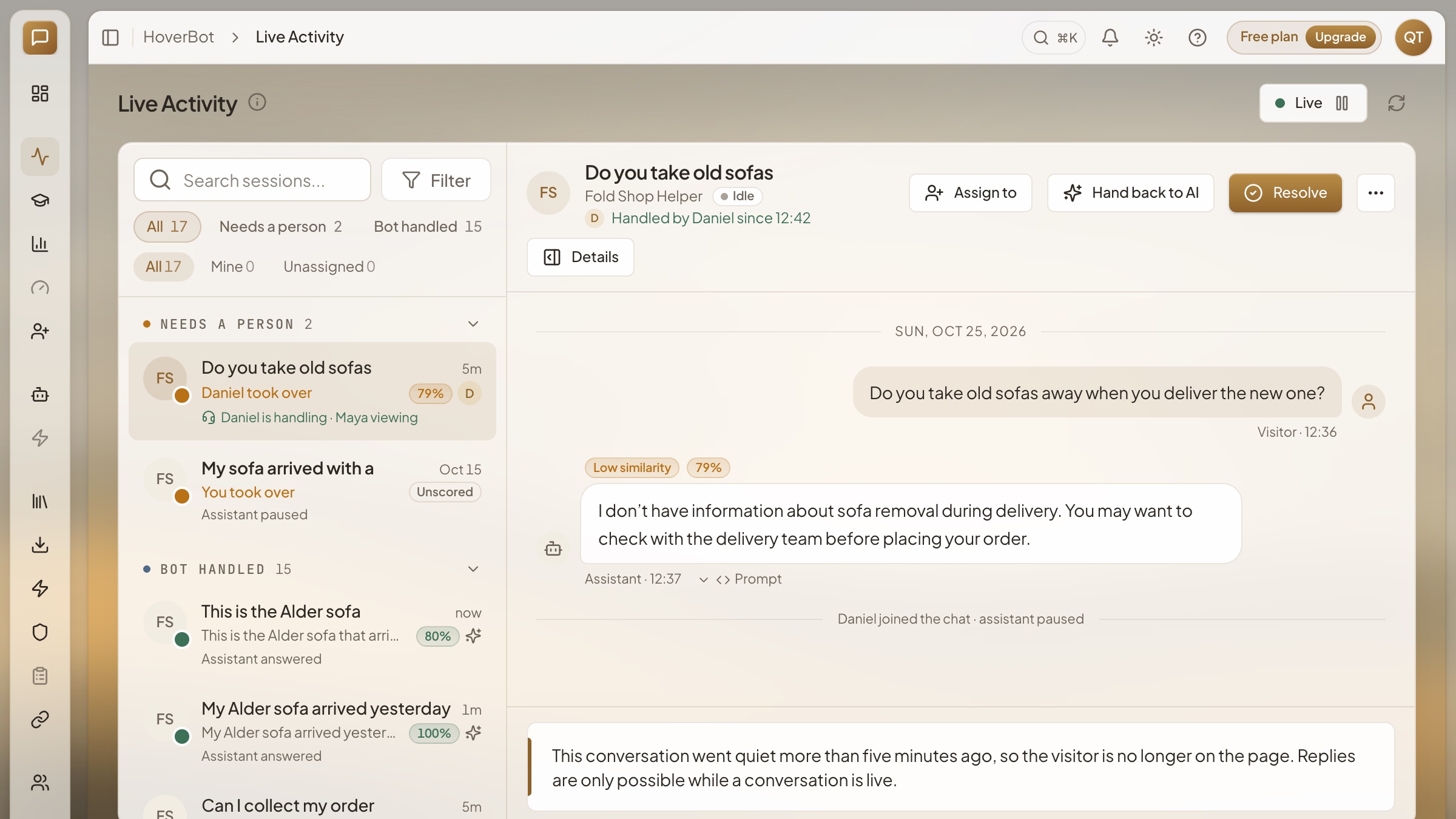
The transfer needs more than a polite closing sentence. In our sample HoverBot workspace, the inbox shows who is handling a conversation, who is viewing it, and an assignment control. The workspace and teammates pictured here are fictional. The useful design question is whether a support lead can see an unfinished handoff and put a name beside it before the customer asks again.
How can I add human escalation to a chatbot?
Begin with four decisions: which messages should leave the bot, where those messages go, what context travels with them, and what the shopper sees while waiting. Configure those decisions in the bot and in the team's inbox. Then run the handoff as a shopper and as the teammate who must answer. A button or phrase that says “talk to a person” is only the entrance; ownership and continuity make it a working route.
The vendor tools differ, but their documentation makes this distinction plain. Intercom describes separate choices for when Fin offers a handoff, when it escalates directly, and what it says. Zendesk describes handing a conversation to a live agent through the account's routing flow and stopping the AI agent from responding after that transfer. Those are operational choices, not copywriting details.
Choose triggers a shopper can understand
Make an explicit request the simplest trigger. “I need a person,” “please connect me to support,” and a visible handoff control should have the same outcome. Do not require the shopper to explain why a second time. Intercom's workflow guidance says a request for human help in the first message can go straight to the handover path without a generated answer. That is a useful test case for any platform, including your own.
Then add a small set of reasons for the bot to initiate the transfer. Repeated failure to answer is one: if a shopper asks the same thing again after a reply, a third attempt at rephrasing may make the situation worse. A missing or conflicting policy is another. A bot should not settle a disputed refund, account access issue, or other consequential action just because it can produce a fluent sentence. When an answer depends on a fact it cannot verify, the next useful act is to collect what is needed and send it to the right person.
Frustration can be a clue, but avoid turning every short or unhappy message into an automatic transfer. “That did not help” may mean the bot searched the wrong source and can ask one clarifying question. An abusive message may need a different team rule. Write down which cases mean offer a person, which mean transfer immediately, and which still allow one more question. Intercom's workflow documentation distinguishes direct human requests, negative feedback, and repeated unresolved replies. Use that as a checklist, then set thresholds that fit your own service hours and staff capacity.
| Shopper signal | Bot action | Human's first job |
|---|---|---|
| Asks for a person | Transfer now | Read the question and reply |
| No verified answer | Explain the gap, then transfer | Check the missing source |
| Repeats an unresolved question | Offer or transfer | Find why the first answer missed |
| Requests an exception or money action | Collect facts, then transfer | Decide under the store's policy |
Carry the conversation, not just a ticket number
The human should open the same thread and see the customer's original words. Include the bot's replies, the policy or product pages it actually used, and the reason it stopped. If an order lookup is available and permitted, include the verified order context too. A generated summary can help a busy teammate scan the case, but it must point back to the original exchange. Otherwise a mistaken summary becomes the human's starting fact.
Assign one owner. A specialist may follow a conversation without becoming its owner; the customer still needs someone responsible for the next reply. Make the queue visible to the support lead and show whether a teammate has accepted it. In HoverBot, this is why we put assignment and teammate presence in the inbox. A support team should be able to answer “who owes the next message?” without opening another report.
Keep the bot quiet after the transfer unless the human deliberately returns the conversation to it. Two voices answering at once can contradict each other or make the shopper repeat a detail. Zendesk's handoff guidance explicitly describes the AI agent no longer responding once the live agent takes over. Test this with a shopper sending another message while the human is typing, not just with a static first message.
The handback deserves its own rule. If a teammate finishes a billing question and the shopper asks a new product question, the person can choose to return that new question to the bot. That choice should be visible in the thread. Do not let a timeout quietly return control to the bot while the teammate is still handling an exception. A support lead should be able to reconstruct which voice answered each message and when the owner changed.
Tell the customer what happens next
A useful handoff message names the action and the wait. “I have sent this conversation to our support team. Someone will reply here during our support hours” is better than “We have escalated your case.” If a person is online, say that the chat is being transferred. If nobody is online, show the hours or the next expected review window that your team can actually meet. Do not promise a minute count you have never measured.
Offline behavior belongs in the design, not in a footnote. Tidio's FAQ describes separate choices for when operators are online and offline: transfer, continue the AI conversation, or create a ticket. For your own bot, decide which path preserves the customer's question and gives the morning team an actionable queue. If the offline path merely hides the chat, it has failed even if the bot's final sentence sounded reassuring.
Check the transfer language on a phone as well as a desktop. A shopper may see only the most recent line of a chat, so the message should stand on its own: who will reply, where, and when. If your support team switches from chat to email, say that before asking for an address, and keep the original thread available to the teammate. Collect only the contact details needed to continue the case. An extra form that asks the shopper to type the whole story again defeats the handoff.
Test the path from both sides
Run at least five conversations before launch: a direct request for a person; a question the bot cannot answer from current sources; a shopper who rejects the first answer; a policy exception; and a request outside support hours. For each one, check the customer's message, the queue entry, the assigned owner, and what the teammate can read. Send a follow-up while a person is handling the case to confirm the bot stays out of the way. A nice bot reply is not evidence that the handoff worked.
Measure the whole path after launch. Count handoffs by reason, time from transfer to a human's first reply, cases with no owner, and customers who ask the same question again after transfer. Open examples behind each number. A high handoff rate might mean prudent boundaries, or it might mean missing knowledge. A low rate might mean the bot resolves questions, or it might mean shoppers cannot find the person route. The transcript decides which interpretation is fair.
Our verdict is straightforward: a chatbot's most trustworthy sentence may be “I need someone to check this.” But that sentence earns trust only when the person can see the case, owns the next action, and can reply without asking the shopper to begin again. You can see the broader operating pattern in our human escalation overview and try support flows with the fictional industry demo bots.
What to change on your bot this week
- Send “I want a person” through your live chat and confirm it lands in an owned queue.
- Test one unanswered policy question and inspect exactly what source context reaches the teammate.
- Ask for help after hours and check that the promised reply window matches your real coverage.
- Send another shopper message during a human reply and confirm the bot stays quiet.
- Review a week's handoffs by reason and open the cases where the customer had to repeat the question.
Frequently asked questions
- How can I add human escalation to a chatbot?
- Start with explicit requests for a person, unanswered questions, repeated failed answers, and actions that need human approval. Route each case to an owned support queue with the transcript and relevant source. Tell the customer whether a person is online and when to expect a reply. Test the path with a real teammate before launch.
- What should trigger a chatbot to escalate?
- A direct request for a person should always work. Also consider repeated failure to answer, missing or conflicting policy information, sensitive account or money decisions, and signs that the customer remains stuck. Treat sentiment as a clue to review, not a verdict by itself. Make the trigger rules visible to the team and test them against real conversations.
- What information should a human receive at handoff?
- Pass the original question, the conversation so far, any verified order or account context the team is allowed to use, the answer sources the bot checked, and the reason for escalation. Assign an owner and preserve the same thread. A short summary can help, but the teammate must be able to inspect the original messages rather than relying on a summary alone.
Sources
About the author
Founder & CEO at HoverBot
Founder of HoverBot, where he leads product strategy and applied AI architecture, and CTO and co-founder of WTFox.ai, a separate company. Nineteen years in software engineering, most recently as Software Architect at Mercer, where he shipped HR chatbots and OCR claims processing on Azure AI, and as tech lead at Darwin and Technosoft SEA, after engineering roles at Sberbank, Veon, and Softline. Hands-on with architecture decisions, deployment operations, and benchmark-driven quality optimization. Based in Singapore.
- 19 years of software engineering, architecture, and engineering leadership
- Founder of two separate AI startups: HoverBot and WTFox.ai
- Applied AI: conversational systems, RAG pipelines, agentic workflows, and safety controls
- Enterprise AI delivery: HR chatbots and OCR claims processing on Azure AI at Mercer
- Led engineering teams of 10+ as tech lead and software architect
- Cross-industry: enterprise HR and benefits, banking, telecom, automotive, e-commerce and marketplaces
- Writes on AI chatbot architecture, agentic systems, and deployment patterns at vitaliks.me