
In short
Seven customer chat operators report different effects after identifying their assistants as AI. Their accounts show why a support team should name the bot’s scope at the start, count requests for a person before and after an answer, and check what its handoff promise delivers.
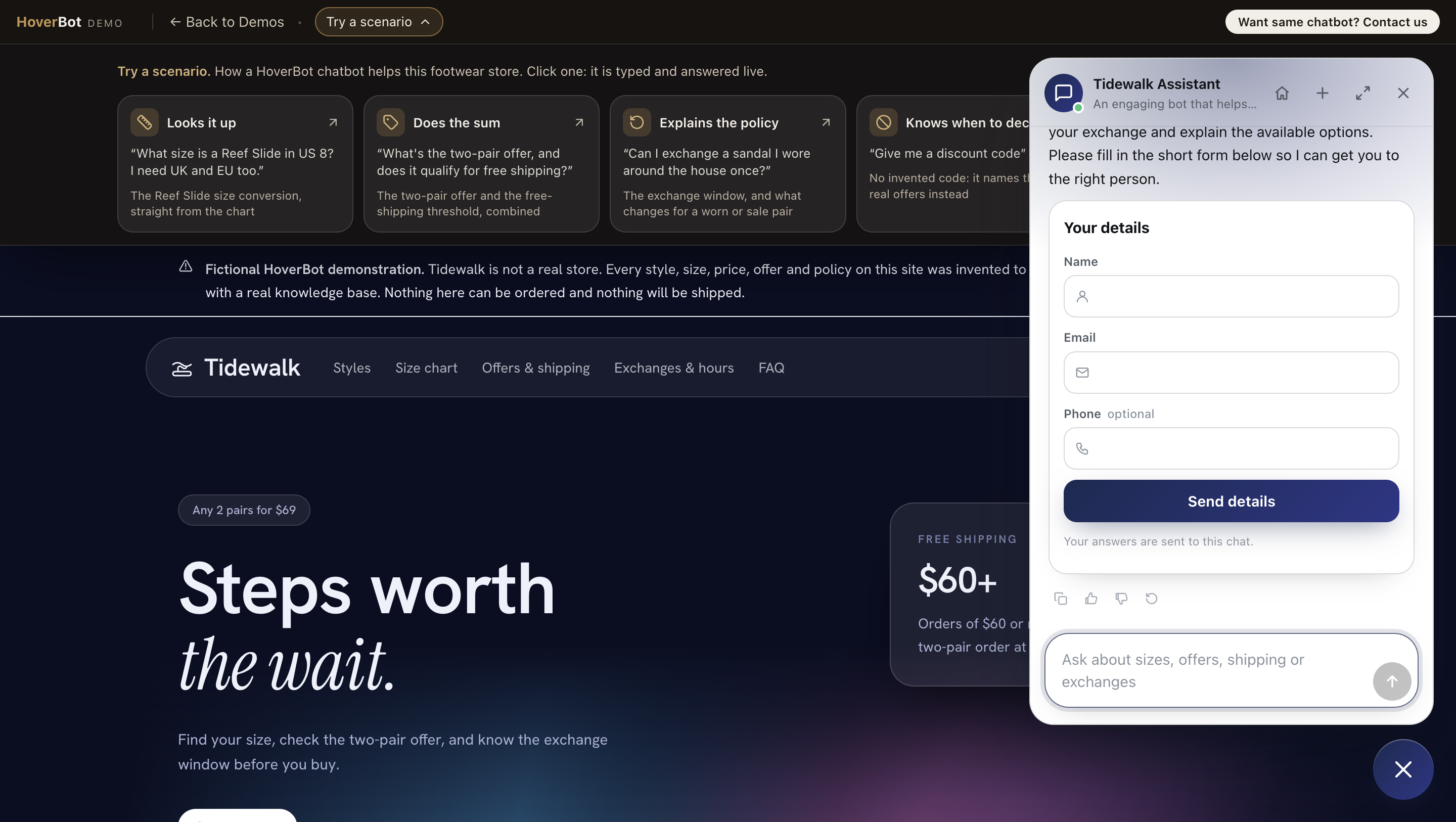
A shopper opens a chat about an exchange. Before typing, the shopper wants to know whether a person will reply. On our fictional Tidewalk footwear demo, we tested the route to a person. When we typed “I want to talk to a person about an exchange,” it offered a short handoff form. The reply did not promise an immediate human arrival.
The EU AI Act’s Article 50 says people should be informed when they interact directly with an AI system, unless that is obvious in context. The information must be clear and distinguishable by the first interaction. That rule makes the opening label worth checking. The operational question is what happens to the chat after the label appears.
We asked one question: “If your company tells customers up front that they are chatting with AI rather than a person, what is one thing that changed when you made that explicit?” Seven people who run a customer-facing chatbot answered. Each figure comes from that operator’s business. HoverBot did not measure those outcomes.
1. People asked the AI assistant more precise questions

“Once people knew they were talking to a bot, they dropped the small talk”
Sina He | Co-founder, Ubackdrop
Read full expert response
Disclose Pip to Elicit Precise Queries The change I didn't expect: customers started asking better questions. Before the first message, our chat window at Ubackdrop now says: "Hi, I'm Pip, Ubackdrop's AI assistant. I can help with sizes, materials, and order tracking. For custom designs, I'll bring in a real person." A small "AI" badge also sits next to Pip's name for the whole conversation.
Once people knew they were talking to a bot, they dropped the small talk and typed things like "8x10 flower wall, white, ships to Texas by the 14th?" Over the 60 days after launch, containment rose from 41% to 58%. That's the share of chats resolved without a human.
The name was a mixed bag. "Pip" alone sounded too human, and a few customers asked whether Pip worked weekends. Pairing the name with the badge fixed that, and people seemed to like having something friendlier to type to than "Assistant."
When a person takes over, the message reads: "I'm handing you to Maria from our design team. She can see everything we've discussed, so you won't need to repeat yourself." Her real photo replaces Pip's icon, so the switch is impossible to miss.
What I'd change today is "I can help with." It promised too much. I'd rather state the limits up front: "I can't approve refunds or custom-print proofs. A person handles those."

“transparency improves automation”
Arsen Misakyan | CEO and Founder, LAXcar
Read full expert response
Label LAXcar Assistant to Cut Takeovers Just letting customers know they are speaking with an AI caused our rate of human takeover to drop from 31% to 22% during a period of eight weeks. Our introduction before sending the message read: "Hello, this is LAXcar AI Assistant. I can help with commonly asked questions and assist you with our team as required."
The reason we didn't choose a human name for our bot is simple: referring to the LAXcar AI Assistant ensured customers were aware of whom they were speaking with without creating false impressions about a real person typing on the other end.
"Unnecessary escalation" refers to situations where the customer is asking a question that can be answered based on the information available to the bot but asks for a human nonetheless.
When a human agent steps in, it appears like this: "A member of the LAXcar team has entered the chat session and will take it from there."
In today's context, I would suggest adding: "You can ask for a person at any time." My personal conclusion is that transparency improves automation.
Sina He says Ubackdrop put its AI label beside the assistant’s name and named the tasks it could handle. Ubackdrop’s containment rose from 41% to 58% over 60 days, by Sina He’s account. Arsen Misakyan reports LAXcar’s human takeover rate falling from 31% to 22% over eight weeks. These are two accounts, with different businesses and measures; neither isolates the badge from the wording and other changes around it.
We would test the scope sentence first. “AI assistant” identifies the speaker. “Sizes, materials and order tracking” gives the shopper a useful first question. The chatbot info card holds the longer explanation, but the opening line has to help before anyone opens a separate page.
2. A name helped one chatbot and hurt another

“naming made interactions feel friendlier and reduced abrupt transfers”
Nicolas Falourd | CEO, Cyber Techwear
Read full expert response
Post Transfer Instructions Before Chat We started telling customers up front that they're chatting with an AI and saw clearer intent signals: people asked product or shipping questions rather than expecting human empathy. The exact banner reads: You're chatting with our AI assistant for fast answers. Type your question or say transfer to reach an agent. It appears before the first message as an info card and in the chat greeting. The bot has a name, Nova, which helped, naming made interactions feel friendlier and reduced abrupt transfers. Before: 28% escalation rate to humans. After 12 weeks: escalation fell to 14%. When a human takes over mid-chat the bot posts: I'm transferring you to a human agent now, please hold briefly, and the human greets with the transfer note and chat history. Today I'd phrase the banner more directly about limitations: You're chatting with AI for quick answers. For complex order issues type transfer to connect to a human.

“removed it because it made the interaction feel too much like talking to a person”
Mark Bietz | CMO, Halloween Costumes
Read full expert response
Add a Warm Help Badge The main improvement came from helping people understand what to expect before starting a chat. We added a badge beside the chat that says, "AI assistant with human help available." The greeting also explains that users are chatting with an AI assistant and can ask questions or request a teammate. We tested using a name for the assistant but removed it because it made the interaction feel too much like talking to a person.
During the test, more conversations were resolved without human help. When a teammate takes over, the transcript explains that they can see what the user has already shared. We would use "human help available" instead of "human backup" because it sounds warmer and explains the next step more clearly.
Nicolas Falourd says Cyber Techwear kept the name Nova and its visible AI introduction while human escalation fell from 28% to 14% over 12 weeks. Mark Bietz says Halloween Costumes removed a human-style name because it blurred the distinction. He did not supply a comparable before-and-after rate. Their disagreement gives teams a useful test to run on their own chat.
Keep the AI label visible if the bot has a name. Ask five people who have never seen your chat who they expect to answer. If they infer a staff member is typing, rewrite the greeting before measuring whether the name feels friendly.
3. The human-request number rose in one test

“the majority of requests for a human occurred immediately after the greeting”
John Mac | Founder, Exit Evidence
Read full expert response
Ditch Bot Personas to Ease Resistance We found that making the disclosure explicit immediately increased the request for a human by 58.7% (from 8.1% to 12.6% over a 4-week period) for an e-commerce client, and this was based on 4,800+ bot conversations. The exact wording we used was "Hi, I'm Scout, an AI assistant for [Brand], and I can help you with product queries, order queries, return queries, or you can ask for a human at any time." We gave the bot a name, and we found this was initially counter-productive, and it seemed to exacerbate the problem, and we felt that saying "I'm Scout" was a massive contradiction in terms, and whilst your customers know it's an AI, saying "I'm" gives them the feeling that you're trying to fool them, and this was confirmed by the fact that the majority of requests for a human occurred immediately after the greeting, and before they had a chance to test the bot's ability to answer their question. We found that the level of resistance to using an AI decreased as our clients' customers became more confident in using this channel, and this really proved to us that functional capability beats form every time, and we also found that not all requests for a human were a distrust of the AI, and some of these were people who didn't like the answer that the bot gave them, and they were hoping that a human would give them a more favourable answer. When the conversation was handed over to a member of our client's staff, the user was told "Hi, this is Jordan, and I'm a real person, and I can answer your question from the information above", and the bot then shut down, and we found this worked very well. In your place, we would word the greeting as follows: Our company's AI bot is here to help you with... you can ask for a human at any time. We feel that giving the bot a name is counter-productive, and it could be that you do not need to go as far as giving your bot a name, and we hope that this gives you the level of confidence that you need to make the change.
John Mac saw requests for a person rise from 8.1% to 12.6% over four weeks across more than 4,800 conversations for an ecommerce client. Most requests came immediately after “Hi, I’m Scout,” before the bot answered a question. His account is a warning against treating every handoff as proof that the assistant failed. Some people wanted a different answer after hearing the first one; others left before trying it.
Split the report into requests before the first answer and requests after an answer. Read the opening message beside those counts. A greeting that says the company’s AI bot is here to help, then names the human route, gives the shopper a clearer choice than a person-like introduction.
4. The handoff must match the disclosure

“a person arriving is expected rather than a surprise”
Silviu Major | Founder, Fiveleaf
Read full expert response
Promise Seamless Agent Transitions We build and run AI agents for a UK fibre broadband provider, on web chat and WhatsApp. The one thing being explicit changed is the handover.
The chat opens, before the first message, with “Hi! This chat is powered by AI, with our team available if needed”, then a privacy policy link and two buttons: I Accept or End Chat. Because customers know from the first line they’re talking to AI, a person arriving is expected rather than a surprise. So we write the handover as keeping that promise.
The agent isn’t allowed a bare “Connecting you now”. It says who is coming and why: “I’m connecting you with someone from our renewals team to help with that, please bear with us.” The person picks up with the whole conversation and a AI summary, so the customer never has to repeat themselves and typically a huge amount of work has already been done and data protection is complete with account details fully loaded. If the customer goes quiet or even when the issue is resolved, they’re told they’ve been passed back to the AI assistant.
The bot has no human name and never has. Customers spot an AI a mile off, if only from how fast it replies, so a persona fools nobody.
No before and after number, I’m afraid: we were explicit from launch.
What I’d word differently: the opening stacks three messages and two buttons before the customer has said a word. It reads like small print. I think naming a bot, gives the expectation that it will do everything a human can, whereas we prefer to keep the expectation that they're talking to a highly capable AI, with human intervention when needed.

“I have read your conversation with our assistant”
Pratik Singh Raguwanshi | Manager, Digital Experience, CXrove
Read full expert response
Choose Functional Labels to Raise Containment When AI status is explicitly mentioned in the chat header, it transforms user behavior from doubt to usefulness. My experience of operating large-scale BPO operations has taught me that instead of using vague greetings, we can use a distinct card before the first message that clearly states: "I am an AI assistant here to assist you quickly. If the issues are complex, I will connect you to a human." What we learned is that calling our bot some functional name such as "Digital Assistant" was more effective than giving it a human name. The human names usually caused an immediate annoyance when the AI couldn't understand the language; contrary, functional names create an understanding of the fact that a user is talking to a tool, not a person. Having made this disclosure explicit, we noticed a 12% increase in containment rates in four months. The users become more open to structured prompts since they know that they are talking to an AI and not a human who has to understand them perfectly. If a person takes over during the conversation, then it sends a final message, which means a human is joining. The agent starts with this: "Hello, my name is Pratik, I have read your conversation with our assistant and I'm becoming responsible for the resolution." If I had to rewrite this first declaration today, I would change it by focusing on the time factor instead: "I am an AI assistant, designed to provide the instant answers. If I cannot help you immediately, I will bring a human to assistance."
Silviu Major describes a broadband support bot that says when someone from renewals will join and passes the conversation on. Pratik Singh Raguwanshi describes an agent who opens by saying he has read the earlier chat. Neither account proves a universal improvement in trust. Both give a sentence the team can check in its own widget.
Our Tidewalk demo answered a request for a person with a form. The form is the first stage of a handoff. We did not verify a teammate arriving. For your own bot, follow the request through the human escalation path: send the details, inspect the team queue, and read the first human reply. If the bot says someone is joining now, a person must be able to join.
5. Put limits and the exit route in the first message
Several respondents would change the sentence they published. Sina He would state what Pip cannot approve. Misakyan would add “You can ask for a person at any time.” Falourd would identify complex order issues as a reason to transfer. Major would remove opening steps that delay the first customer message. The repeated lesson is practical: a label alone cannot tell someone which question to ask or when to leave the bot.
Singapore’s IMDA voluntary chatbot transparency guidelines likewise put capabilities, limitations, data use and reporting in a short, reachable explanation. They are guidance, not a substitute for the law that applies to your business. Our verdict: name the assistant as AI at the first interaction, state two or three jobs it can do, and show a real route to a person. Then test each promise in the live chat.
Four checks for your own chatbot this week
- Open the chat as a new visitor on desktop and phone. Check that “AI” appears before the first message.
- Read the first line without knowing your product. Does it name the questions the bot can answer and one limit?
- Ask for a person before any answer, then again after an answer you reject. Count those paths separately.
- Follow a handoff through the form, queue and first human reply. Check that the teammate can see the earlier messages and that the wait promise is true.
Try a live fictional example at the Tidewalk demo. For the team-side controls, see human escalation and the trust center.
Frequently asked questions
- Should an AI chatbot have a human name?
- A name can work when the AI label remains visible. In the seven operator accounts, one store kept a name and another removed it because shoppers might assume a person was typing. Ask new visitors who they think answers the chat, then check whether the opening label and greeting give them the right expectation before keeping a name.
- What should an AI chatbot disclosure say?
- Identify the chat as AI before the first message, name the tasks it handles, state a useful limit and show how to ask for a person. Keep the longer explanation easy to reach from the widget. For an EU-facing system, read Article 50 of the EU AI Act and check the rule against your own service and jurisdiction.
- What should the bot say when a person takes over?
- Say who is joining, whether they can read the earlier conversation and what the customer should expect while waiting. Then send a test request through the live chat, inspect the team queue and read the first human reply. A form appearing in the widget proves only that details can be collected; it does not prove a teammate has taken over.
- Does telling customers they are chatting with AI reduce requests for a person?
- There is no single direction in the seven operator accounts. Some report fewer handoffs after making disclosure explicit; one reports more requests immediately after the greeting. Their businesses and measures differ, so the figures are not a benchmark. Count requests before and after the first bot answer separately, and read the chat messages to understand why people asked.
Sources
- Artificial Intelligence Act, Article 50 · European Union
- Transparency Guidelines for Generative AI Chatbots · IMDA
About the author
AI Product Engineering Team
Cross-functional team of AI engineers, product managers, and support operators building customer-facing chatbot systems in production environments. We ship weekly releases informed by production telemetry, closed-loop conversation reviews, and benchmark-driven evaluation cycles.
- Customer support automation and intelligent routing systems
- RAG pipeline design and guardrails for regulated workflows
- Operational analytics and closed-loop quality improvement
- Multilingual NLP and entity-level PII masking pipelines
- Production deployments across e-commerce, real estate, and SaaS verticals
Get the next one
We write up what we find testing chatbots on real stores: wrong answers, handoffs that drop customers, and what fixed them. Follow HoverBot to see each one when it ships.
Related Articles



HoverBot for your industry
AI Chatbot Solutions by Industry